
Streamline Your Browser Tasks with Simlink

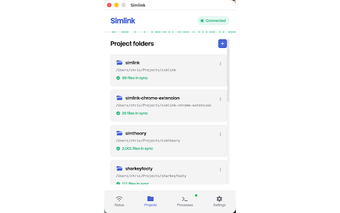
Simlink is a powerful Chrome extension designed to enhance browser automation through AI capabilities. It allows users to delegate various web tasks to their AI assistant, enabling intelligent navigation, automated form filling, and data extraction without the need for APIs. This tool is particularly useful for compliance teams, sales operations, research departments, and more, as it effectively handles repetitive tasks, ensuring accuracy and efficiency across various web applications.

With features like real-time verification and enterprise-grade security, Simlink ensures that all browser interactions remain local until explicitly shared. The extension's ability to interpret web pages like a human offers a significant advantage over traditional browser automation tools, requiring no custom coding or maintenance. As a result, users can focus on strategic tasks while their AI assistant manages the routine aspects of web-based workflows.

 0/1

App specs

  • License

    Free

  • Version

    1.0.1

  • Latest update

  • Platform

    chrome

  • Language

    English

  • Developer

Program available in other languages


User reviews about Simlink

Have you tried Simlink? Be the first to leave your opinion!

Add review

Top extensions for Google Chrome

Top downloads Add-ons & Tools for Google Chrome

Top downloads Add-ons & Tools for Google Chrome

Top downloads Add-ons & Tools for Google Chrome

Related topics about Simlink

Softonic

Is Simlink safe?

100/100

Score result: Clean

This file passed a comprehensive security scan using VirusTotal technology. It is safe to download.

  • Virus free
  • Spyware free
  • Malware free
  • Verified by Security Partners

    VirusTotal logo

Scan Info

Last scan
Saturday, April 4, 2026
Scan provider
VirusTotal

Softonic security commitment

Simlink has been thoroughly scanned by our advanced security systems and verified by industry-leading partners. This file comes from the official developer and has passed all our security checks, showing no signs of viruses, malware, or spyware. For more information, visit our Security and Trust Center